Objective
Setting up automatic USB drive mounting on a Linux server using systemd mount and automount units
Environment
- OS: Ubuntu
- Tools: system, USB drive
Step 1 - Find Partition UUID
Prerequisite: Plugin USB drive
blkid /dev/sdb1

Note: UUID and filesystem type
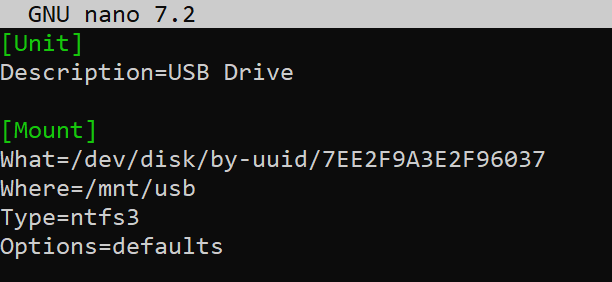
Step 2 - Create the Mount Unit
sudo nano /etc/systemd/system/mnt-usb.mount
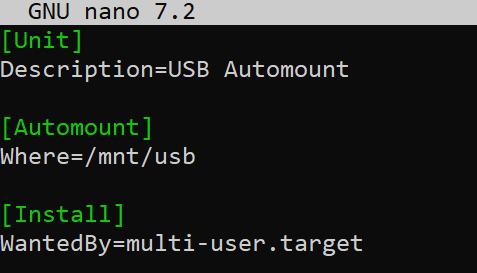
Step 3 - Create Automount Unit
sudo nano /etc/systemd/system/mnt-usb.automount
Step 4 - Enable and Start
sudo systemctl enable mnt-usb.automount
sudo systemctl start mnt-usb.automount
Step 5 - Verify and test
Check the automount is active:
systemctl status mnt-usb.automount

Trigger the mount by accessing the path:
ls -l /mnt/usb

Verify it’s mounted:
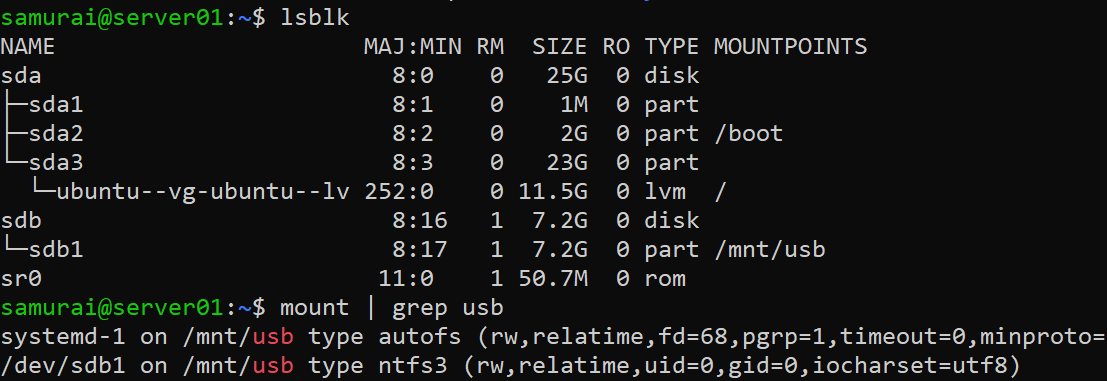
lsblk
mount | grep usb